Amazon S3 is the Simple Storage Service provided by Amazon Web Services (AWS) for object based file storage. With the increase of Big Data Applications and cloud computing, it is absolutely necessary that all the "big data" shall be stored on the cloud for easy processing over the cloud applications.
In this tutorial, you will learn how to use Amazon S3 service via the Python library Boto3. You will learn how to create S3 Buckets and Folders, and how to upload and access files to and from S3 buckets. Eventually, you will have a Python code that you can run on EC2 instance and access your data on the cloud while it is stored on the cloud.
Follow along on how to Install AWS CLI and How to Configure and Install Boto3 Library from that post.
import boto3
Create the boto3 client.
s3 = boto3.client('s3')
response = s3.list_buckets()
print(response)
You get a JSON response
{'Buckets': [{'CreationDate': datetime.datetime(2019, 3, 6, 16, 35, 37, tzinfo=tzutc()),
   'Name': 'testbuckethp'},
  {'CreationDate': datetime.datetime(2019, 3, 6, 16, 35, 46, tzinfo=tzutc()),
   'Name': 'testbuckethp2'}],
 'Owner': {'DisplayName': 'harshvypandya',
  'ID': '16150aa9e7d75fa3c4086a6c5bec7c36aaf1fcac0251a9557cc914148c8205e7'},
 'ResponseMetadata': {'HTTPHeaders': {'content-type': 'application/xml',
   'date': 'Wed, 06 Mar 2019 16:36:10 GMT',
   'server': 'AmazonS3',
   'transfer-encoding': 'chunked',
   'x-amz-id-2': 'ms7TdSsaLB94+Ro8ugEhRx2IbmwJocNLfqf0DhndH5nRquwRg5rwRuIbRY+Rlun2qBl12byu9rw=',
   'x-amz-request-id': '41AF05A6535EBB7D'},
  'HTTPStatusCode': 200,
  'HostId': 'ms7TdSsaLB94+Ro8ugEhRx2IbmwJocNLfqf0DhndH5nRquwRg5rwRuIbRY+Rlun2qBl12byu9rw=',
  'RequestId': '41AF05A6535EBB7D',
  'RetryAttempts': 0}}
Use the following function to extract the necessary information. You need to import Pandas first.
import pandas as pd
def status_df(response):
    return pd.DataFrame({
    'ts': [(x['CreationDate']) for x in response['Buckets']],
    'bucket name': [x['Name'] for x in response['Buckets']]
})
You can invoke the function as
status_df(response)
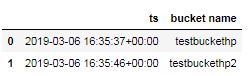
As shown, I have 2 S3 buckets named `testbuckethp` and `testbuckethp2`. It is required that your bucket is unique, globally. As a result, you might need put in some efforts to come up with a unique name.
s3.create_bucket(Bucket='testbuckethp3py')
Output:
{'Location': '/testbuckethp3py',
 'ResponseMetadata': {'HTTPHeaders': {'content-length': '0',
   'date': 'Wed, 06 Mar 2019 16:36:44 GMT',
   'location': '/testbuckethp3py',
   'server': 'AmazonS3',
   'x-amz-id-2': '0kVfDcfYvtb7D2/JFx6L+uJb12TlCng9OppijphFZ5cFxl6EajMfI+uTQhfqTFcpXH/+YXN/Hog=',
   'x-amz-request-id': 'D1164B16FA1F5EC9'},
  'HTTPStatusCode': 200,
  'HostId': '0kVfDcfYvtb7D2/JFx6L+uJb12TlCng9OppijphFZ5cFxl6EajMfI+uTQhfqTFcpXH/+YXN/Hog=',
  'RequestId': 'D1164B16FA1F5EC9',
  'RetryAttempts': 0}
Let us check the status dataframe that lists all the buckets and their creation time.
response = s3.list_buckets()
status_df(response)
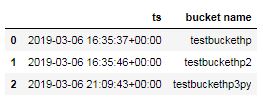
As you can see, now I have three buckets namely, `testbuckethp`, `testbuckethp2` and a newly made `testbuckethp3py`.
s3.upload_file('testfile.txt', 'testbuckethp3py', 'testfile_s3.txt')
In this case, you have a file called `testfile.txt`Â in the same directory as you Python script. I want to upload that to the newly created s3 bucket with the name `testfile_s3.txt`. The code does not return anything and hence passes without error.
In fact, S3 is simply key-value pair storage system. Each object is given a unique key across the bucket and hence the object access is faster than a directory level file access. In this key `/` is interpreted as a directory and as a result, you can specify as many as directory-sub directory as possible, without actually creating it.
Putting an object is very similar to uploading a file, except, it needs the body of the file rather than the filepath.
with open('testfile.txt', 'r') as f:
    content = f.read()

s3.put_object(Body = content, Bucket = 'testbuckethp3py', Key = 'testdir/testfile.txt')
The code first gets the body of the file by reading it. Next, it created the directory like structure on the bucket, as specified by the `key` 'testdir/testfile.txt'.
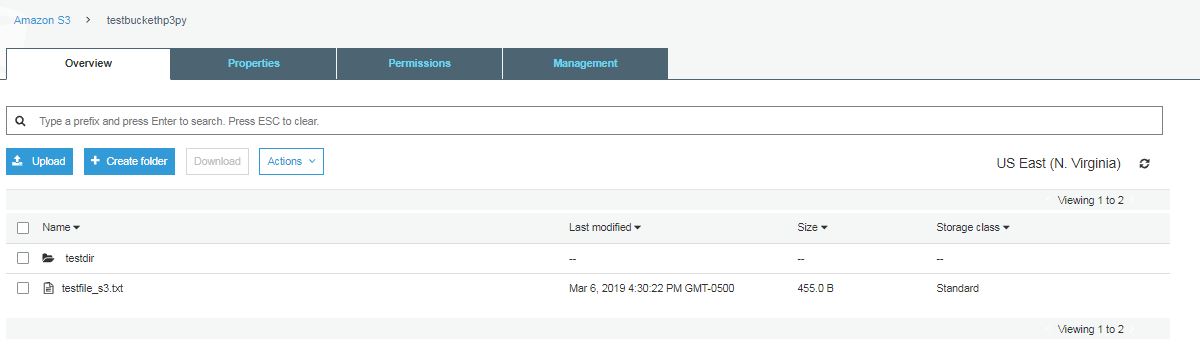
As you can see, the S3 bucket creates a folder and in that folder, I can see the file, `testfile.txt`.
This way, you can structure your data, in the way you desire.
I have extracted a small piece of the data, with New York State data only. Similar to a text file uploaded as an object, you can upload the csv file as well.
with open('data/New York/New York_population.csv', 'r') as f:
    content = f.read()

s3.put_object(Body = content, Bucket = 'testbuckethp3py', Key = 'NewYork/population.csv')
Output:
{'ETag': '"7d0c9fd9023234f3508633c1866dfb98"',
 'ResponseMetadata': {'HTTPHeaders': {'content-length': '0',
   'date': 'Wed, 06 Mar 2019 16:51:02 GMT',
   'etag': '"7d0c9fd9023234f3508633c1866dfb98"',
   'server': 'AmazonS3',
   'x-amz-id-2': 'ub//o0r9B+6mQD0bQFOcHGQKWSVrn4eol897bmijhbWxYWvi5lk/xscQxys6LM/k/KduVHHIsG4=',
   'x-amz-request-id': '1540534E1F5ED7A7'},
  'HTTPStatusCode': 200,
  'HostId': 'ub//o0r9B+6mQD0bQFOcHGQKWSVrn4eol897bmijhbWxYWvi5lk/xscQxys6LM/k/KduVHHIsG4=',
  'RequestId': '1540534E1F5ED7A7',
  'RetryAttempts': 0}}
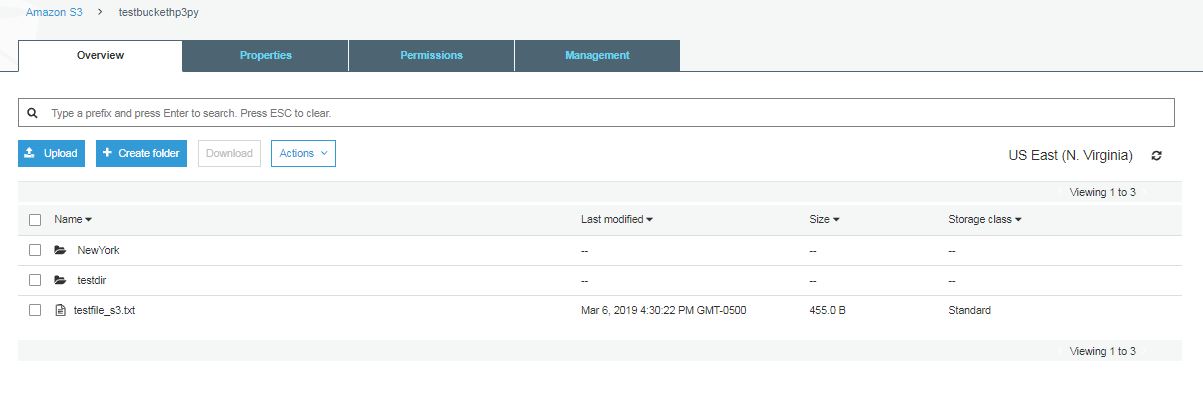
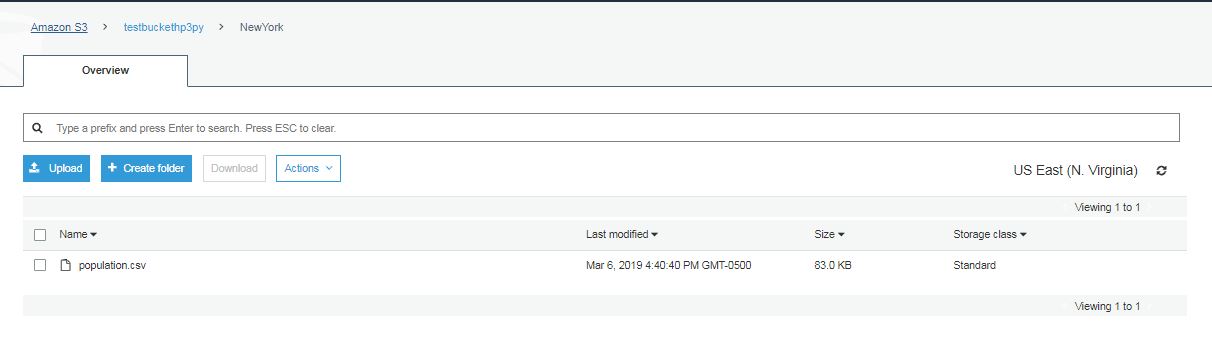
As you see, it creates a new folder (New York) like structure and inside that folder, I can see my csv file.
Create the resource object.
s3_resource = boto3.resource('s3')
In order to access the object, you need to have the right bucketname and the right key.
s3_object = s3_resource.Object(bucket_name='testbuckethp3py', key='NewYork/population.csv')
From this object, you need to access the body of the object.
from io import StringIO
import pandas as pd

s3_data = StringIO(s3_object.get()['Body'].read().decode('utf-8'))
data = pd.read_csv(s3_data)
print(data.head())
Output:

import boto3
import pandas as pd

# helper function to print s3 buckets

def status_df(response):
    return pd.DataFrame({
    'ts': [(x['CreationDate']) for x in response['Buckets']],
    'bucket name': [x['Name'] for x in response['Buckets']]

})
# create client object

s3 = boto3.client('s3')

# list all s3 buckets

response = s3.list_buckets()
print(response)

print(status_df(response))

# create S3 bucket
s3.create_bucket(Bucket='testbuckethp3py')
response = s3.list_buckets()
status_df(response)

# upload file

with open('testfile.txt', 'r') as f:
    content = f.read()

print(content)
s3.upload_file('testfile.txt', 'testbuckethp3py', 'testfile_s3.txt')


# create directory structure

s3.put_object(Body = content, Bucket = 'testbuckethp3py', Key = 'testdir/testfile.txt')


# upload a csv file


with open('data/New York/New York_population.csv', 'r') as f:
    content = f.read()

s3.put_object(Body = content, Bucket = 'testbuckethp3py', Key = 'NewYork/population.csv')


# access file from s3
s3_resource = boto3.resource('s3')

s3_object = s3_resource.Object(bucket_name='testbuckethp3py', key='NewYork/population.csv')

from io import StringIO

s3_data = StringIO(s3_object.get()['Body'].read().decode('utf-8'))


data = pd.read_csv(s3_data)
print(data.head())