Amazon Web Services is one of the world's leading cloud service provider. among many services, Elastic Compute Cloud (EC2) allows users to rent virtual computers over the AWS.
In this tutorial, you will learn how to monitor, create and manage EC2 instances using Python. AWS has launched the Python library called Boto 3, which is a Python SDK for AWS resources. This tutorial will cover how to install, configure and get started with Boto3 library for your AWS account. This tutorial will also cover how to start, stop, monitor, create and terminate Amazon EC2 instances using Python programs.
Finally, the tutorial provides Python code to easily see EC2 instances and key information in tabular format and ways to query EC2 instances for dynamic access and monitoring.
You can install AWS CLI using `pip`.
`pip install awscli`
This would install the AWS CLI on your machine. Refer to docs for more information.
Note: On Linux or Mac, you might need to start with sudo to avoid permission issues.
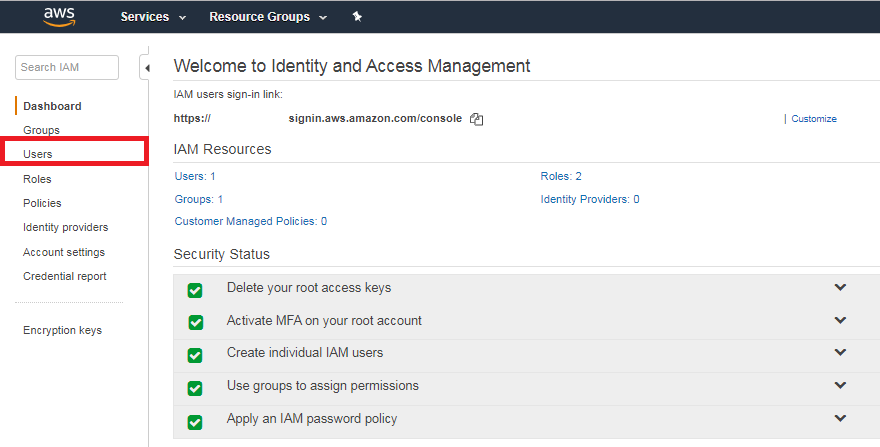
In order to authenticate credentials for AWS account, head over to IAM Console on AWS.
Click to Users where you will be able to see all existing users.
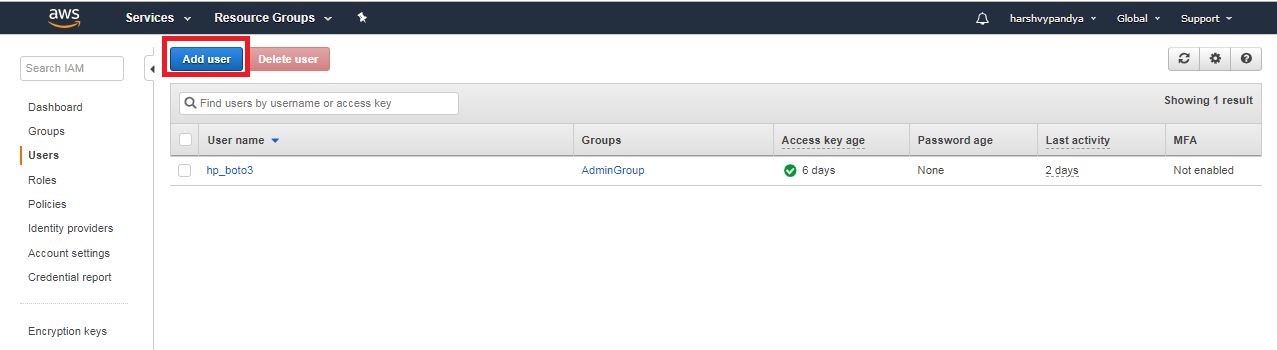
Create a new user by clicking on Add User .
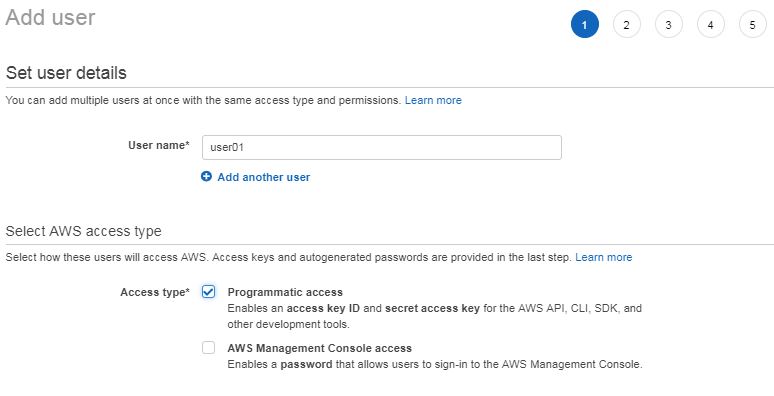
Give a username and Click on Programmatic access checkbox. Click Next on the bottom of the page.
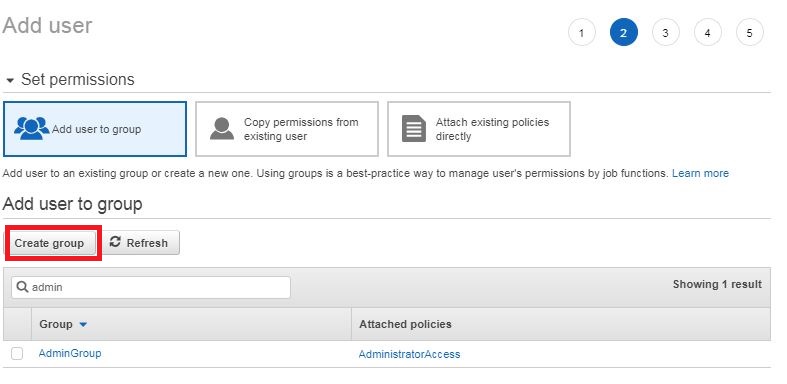
If there are no groups already in existence, click on Create Group.
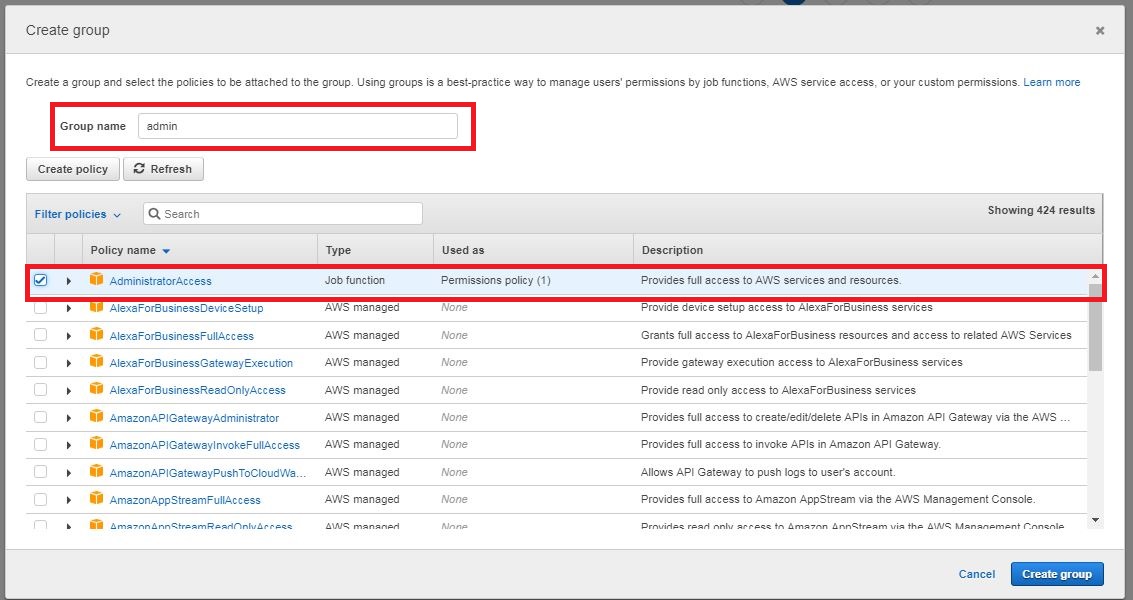
Type in "admin" in the Group name search bar and select AdministratorAccess from the results. This gives Admin access to this user and full access to all the AWS services and resources. Ideally, you want to restrict a user / application to only the resources that it would need. Click on Create group.
That would lead you to the Add Tags page. Let us skip that for now.
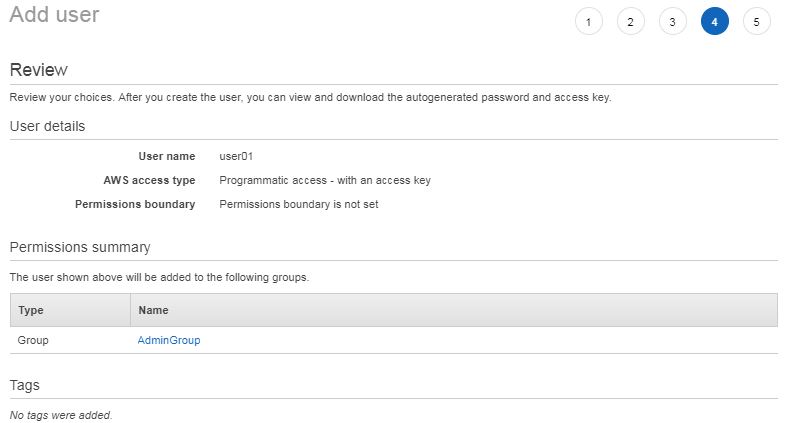
Review the information once, and click on Create user.
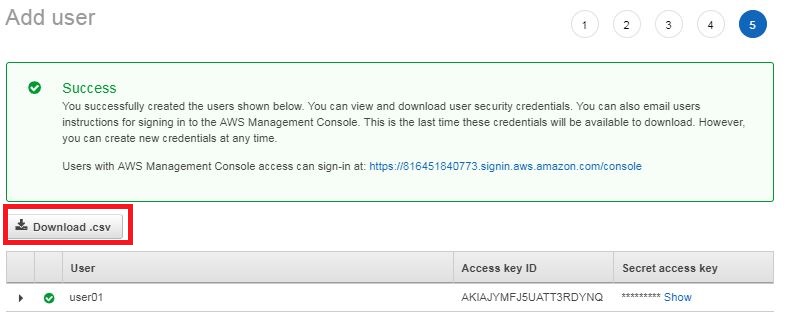
Click on Download .csv and save your Access Key ID and Secret access key in a safe place. You will never be able to see this in future. However you would be able to regenerate / reset it. That is why it is important to back up the credential file and keep it safe.
Open Command Promt / Terminal and type
`aws configure`
It would prompt you for your `AWS Access Key ID` , `AWS Secret Access Key` which you should have saved from the earlier screen. It also asks you for the `Default region name`. Since I live on the East Cost of the US, I have selected N.Virginia ( `us-east-1` ) as my Default region.

Remember, never to share your Secret Access Key to anyone. That it the identity of your user and the application.
Pro Tip: If you were to ever put credentials in the project folder and then share on GitHub, put the credentials file in the `./gitignore`Â and your credentials will never be pushed.
You are all set with the installation and configuration.
pip or if you are using anaconda distribution, using `conda install` would install the Boto 3 library.
pip install boto3
Or to install the package with Conda, run this line:
`conda install -c anaconda boto3`
import boto3

ec2 = boto3.client('ec2')
response = ec2.describe_instances()

print(response)
Gives the Output:
{'Reservations': [{'Groups': [], 'Instances': [{'AmiLaunchIndex': 0, 'ImageId': 'ami-0aeaed2faa756912c', 'InstanceId': 'i-0fc36bf8fef1fe9fe', 'InstanceType': 't2.micro', 'KeyName': 'hp-ai-ts', 'LaunchTime': datetime.datetime(2019, 2, 18, 21, 32, 22, tzinfo=tzutc()), 'Monitoring': {'State': 'disabled'}, 'Placement': {'AvailabilityZone': 'us-east-1d', 'GroupName': '', 'Tenancy': 'default'}, 'Platform': 'windows', 'PrivateDnsName': 'ip-172-31-87-91.ec2.internal', 'PrivateIpAddress': '172.31.87.91', 'ProductCodes': [], 'PublicDnsName': 'ec2-3-80-152-152.compute-1.amazonaws.com', 'PublicIpAddress': '3.80.152.152', 'State': {'Code': 16, 'Name': 'running'}, 'StateTransitionReason': '', 'SubnetId': 'subnet-fc73e3d2', 'VpcId': 'vpc-1bb31261', 'Architecture': 'x86_64', 'BlockDeviceMappings': [{'DeviceName': '/dev/sda1', 'Ebs': {'AttachTime': datetime.datetime(2019, 2, 18, 21, 32, 23, tzinfo=tzutc()), 'DeleteOnTermination': True, 'Status': 'attached', 'VolumeId': 'vol-0f91b715e4e428e74'}}], 'ClientToken': '', 'EbsOptimized': False, 'EnaSupport': True, 'Hypervisor': 'xen', 'NetworkInterfaces': [{'Association': {'IpOwnerId': 'amazon', 'PublicDnsName': 'ec2-3-80-152-152.compute-1.amazonaws.com', 'PublicIp': '3.80.152.152'}, 'Attachment': {'AttachTime': datetime.datetime(2019, 2, 18, 21, 32, 22, tzinfo=tzutc()), 'AttachmentId': 'eni-attach-015f96997ed8f31ad', 'DeleteOnTermination': True, 'DeviceIndex': 0, 'Status': 'attached'}, 'Description': '', 'Groups': [{'GroupName': 'launch-wizard-9', 'GroupId': 'sg-0f6fdd96bdcb9646a'}], 'Ipv6Addresses': [], 'MacAddress': '12:e5:4a:9e:75:b2', 'NetworkInterfaceId': 'eni-04cc02a6a36dddeeb', 'OwnerId': '816451840773', 'PrivateDnsName': 'ip-172-31-87-91.ec2.internal', 'PrivateIpAddress': '172.31.87.91', 'PrivateIpAddresses': [{'Association': {'IpOwnerId': 'amazon', 'PublicDnsName': 'ec2-3-80-152-152.compute-1.amazonaws.com', 'PublicIp': '3.80.152.152'}, 'Primary': True, 'PrivateDnsName': 'ip-172-31-87-91.ec2.internal', 'PrivateIpAddress': '172.31.87.91'}], 'SourceDestCheck': True, 'Status': 'in-use', 'SubnetId': 'subnet-fc73e3d2', 'VpcId': 'vpc-1bb31261'}], 'RootDeviceName': '/dev/sda1', 'RootDeviceType': 'ebs', 'SecurityGroups': [{'GroupName': 'launch-wizard-9', 'GroupId': 'sg-0f6fdd96bdcb9646a'}], 'SourceDestCheck': True, 'VirtualizationType': 'hvm', 'CpuOptions': {'CoreCount': 1, 'ThreadsPerCore': 1}}], 'OwnerId': '816451840773', 'ReservationId': 'r-01e41435f51390dc1'}, {'Groups': [], 'Instances': [{'AmiLaunchIndex': 0, 'ImageId': 'ami-0aeaed2faa756912c', 'InstanceId': 'i-03a07cd4a54a74a6c', 'InstanceType': 't2.micro', 'KeyName': 'hp-ai-ts', 'LaunchTime': datetime.datetime(2019, 2, 18, 21, 32, 4, tzinfo=tzutc()), 'Monitoring': {'State': 'disabled'}, 'Placement': {'AvailabilityZone': 'us-east-1d', 'GroupName': '', 'Tenancy': 'default'}, 'Platform': 'windows', 'PrivateDnsName': 'ip-172-31-90-49.ec2.internal', 'PrivateIpAddress': '172.31.90.49', 'ProductCodes': [], 'PublicDnsName': '', 'State': {'Code': 80, 'Name': 'stopped'}, 'StateTransitionReason': 'User initiated (2019-02-18 21:40:22 GMT)', 'SubnetId': 'subnet-fc73e3d2', 'VpcId': 'vpc-1bb31261', 'Architecture': 'x86_64', 'BlockDeviceMappings': [{'DeviceName': '/dev/sda1', 'Ebs': {'AttachTime': datetime.datetime(2019, 2, 18, 21, 32, 5, tzinfo=tzutc()), 'DeleteOnTermination': True, 'Status': 'attached', 'VolumeId': 'vol-054e7487ab878e98c'}}], 'ClientToken': '', 'EbsOptimized': False, 'EnaSupport': True, 'Hypervisor': 'xen', 'NetworkInterfaces': [{'Attachment': {'AttachTime': datetime.datetime(2019, 2, 18, 21, 32, 4, tzinfo=tzutc()), 'AttachmentId': 'eni-attach-0a095fae1572ad598', 'DeleteOnTermination': True, 'DeviceIndex': 0, 'Status': 'attached'}, 'Description': '', 'Groups': [{'GroupName': 'launch-wizard-8', 'GroupId': 'sg-0b5fe148529a9ead5'}], 'Ipv6Addresses': [], 'MacAddress': '12:40:18:09:2a:3e', 'NetworkInterfaceId': 'eni-0930c7706ec2d6bbb', 'OwnerId': '816451840773', 'PrivateDnsName': 'ip-172-31-90-49.ec2.internal', 'PrivateIpAddress': '172.31.90.49', 'PrivateIpAddresses': [{'Primary': True, 'PrivateDnsName': 'ip-172-31-90-49.ec2.internal', 'PrivateIpAddress': '172.31.90.49'}], 'SourceDestCheck': True, 'Status': 'in-use', 'SubnetId': 'subnet-fc73e3d2', 'VpcId': 'vpc-1bb31261'}], 'RootDeviceName': '/dev/sda1', 'RootDeviceType': 'ebs', 'SecurityGroups': [{'GroupName': 'launch-wizard-8', 'GroupId': 'sg-0b5fe148529a9ead5'}], 'SourceDestCheck': True, 'StateReason': {'Code': 'Client.UserInitiatedShutdown', 'Message': 'Client.UserInitiatedShutdown: User initiated shutdown'}, 'VirtualizationType': 'hvm', 'CpuOptions': {'CoreCount': 1, 'ThreadsPerCore': 1}}], 'OwnerId': '816451840773', 'ReservationId': 'r-04c57b73eb9122b15'}, {'Groups': [], 'Instances': [{'AmiLaunchIndex': 0, 'ImageId': 'ami-0aeaed2faa756912c', 'InstanceId': 'i-0c702a9f1233db36b', 'InstanceType': 't2.micro', 'KeyName': 'hp-ai-ts', 'LaunchTime': datetime.datetime(2019, 2, 18, 18, 59, 39, tzinfo=tzutc()), 'Monitoring': {'State': 'disabled'}, 'Placement': {'AvailabilityZone': 'us-east-1d', 'GroupName': '', 'Tenancy': 'default'}, 'Platform': 'windows', 'PrivateDnsName': 'ip-172-31-81-212.ec2.internal', 'PrivateIpAddress': '172.31.81.212', 'ProductCodes': [], 'PublicDnsName': 'ec2-3-95-182-209.compute-1.amazonaws.com', 'PublicIpAddress': '3.95.182.209', 'State': {'Code': 16, 'Name': 'running'}, 'StateTransitionReason': '', 'SubnetId': 'subnet-fc73e3d2', 'VpcId': 'vpc-1bb31261', 'Architecture': 'x86_64', 'BlockDeviceMappings': [{'DeviceName': '/dev/sda1', 'Ebs': {'AttachTime': datetime.datetime(2019, 2, 18, 18, 59, 40, tzinfo=tzutc()), 'DeleteOnTermination': True, 'Status': 'attached', 'VolumeId': 'vol-05502fe1960d9655c'}}], 'ClientToken': '', 'EbsOptimized': False, 'EnaSupport': True, 'Hypervisor': 'xen', 'NetworkInterfaces': [{'Association': {'IpOwnerId': 'amazon', 'PublicDnsName': 'ec2-3-95-182-209.compute-1.amazonaws.com', 'PublicIp': '3.95.182.209'}, 'Attachment': {'AttachTime': datetime.datetime(2019, 2, 18, 18, 59, 39, tzinfo=tzutc()), 'AttachmentId': 'eni-attach-054bb6c98ea234cd9', 'DeleteOnTermination': True, 'DeviceIndex': 0, 'Status': 'attached'}, 'Description': '', 'Groups': [{'GroupName': 'launch-wizard-7', 'GroupId': 'sg-0a373445f9326d87e'}], 'Ipv6Addresses': [], 'MacAddress': '12:6f:55:62:5d:2a', 'NetworkInterfaceId': 'eni-029949f0227fae48b', 'OwnerId': '816451840773', 'PrivateDnsName': 'ip-172-31-81-212.ec2.internal', 'PrivateIpAddress': '172.31.81.212', 'PrivateIpAddresses': [{'Association': {'IpOwnerId': 'amazon', 'PublicDnsName': 'ec2-3-95-182-209.compute-1.amazonaws.com', 'PublicIp': '3.95.182.209'}, 'Primary': True, 'PrivateDnsName': 'ip-172-31-81-212.ec2.internal', 'PrivateIpAddress': '172.31.81.212'}], 'SourceDestCheck': True, 'Status': 'in-use', 'SubnetId': 'subnet-fc73e3d2', 'VpcId': 'vpc-1bb31261'}], 'RootDeviceName': '/dev/sda1', 'RootDeviceType': 'ebs', 'SecurityGroups': [{'GroupName': 'launch-wizard-7', 'GroupId': 'sg-0a373445f9326d87e'}], 'SourceDestCheck': True, 'VirtualizationType': 'hvm', 'CpuOptions': {'CoreCount': 1, 'ThreadsPerCore': 1}}], 'OwnerId': '816451840773', 'ReservationId': 'r-0ef71dd7d06e77ff0'}], 'ResponseMetadata': {'RequestId': '23b6891c-1d9c-4b56-8f71-9031095460bd', 'HTTPStatusCode': 200, 'HTTPHeaders': {'content-type': 'text/xml;charset=UTF-8', 'transfer-encoding': 'chunked', 'vary': 'Accept-Encoding', 'date': 'Mon, 18 Feb 2019 21:41:09 GMT', 'server': 'AmazonEC2'}, 'RetryAttempts': 0}}
That is a long JSON output, which is hard to understand and read.

As you see, at this point, there are 2 EC2 instances running and 1 EC2 instance stopped. Boto3 is a JSON output model. Meaning, it would represent all the information in the JSON structure, which is very complex.
The function below grabs the necessary information and makes a pandas dataframe for us representing the EC2 instances.
import pandas as pd
def get_ec2_status(response):
    av_zones, instance_ids, state_names= [], [], []
    for res in response['Reservations']:
        for ins in res['Instances']:
            av_zones.append(ins['Placement']['AvailabilityZone'])
            instance_ids.append(ins['InstanceId'])
            state_names.append(ins['State']['Name'])
    return pd.DataFrame({
        'InstanceId': instance_ids,
        'Availibility Zone': av_zones,
        'State': state_names
    })
Now, invoke the function:
data_ec2 = get_ec2_status(response)
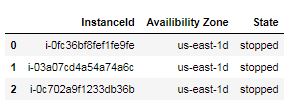
Output of `data_ec2`:
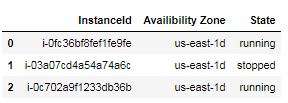
From the JSON output, this dataframe is much more easy to understand and comprehend.
Here all the instances are queried and the output is stored into response. One can always use Filter and ask for specific EC2 instances. For example,
response_running = ec2.describe_instances(Filters=[{'Name' : 'instance-state-name','Values' : ['running']}])
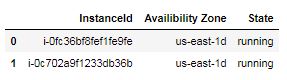
returns all the `running` EC2 instances.
data_ec2_running = get_ec2_status(response_running)
Gives output:
ec2.monitor_instances(InstanceIds = ['i-0fc36bf8fef1fe9fe'])
Output:
{'InstanceMonitorings': [{'InstanceId': 'i-0fc36bf8fef1fe9fe',
   'Monitoring': {'State': 'pending'}}],
 'ResponseMetadata': {'HTTPHeaders': {'content-length': '424',
   'content-type': 'text/xml;charset=UTF-8',
   'date': 'Mon, 18 Feb 2019 21:59:28 GMT',
   'server': 'AmazonEC2'},
  'HTTPStatusCode': 200,
  'RequestId': 'd1b762e1-3eca-4621-96e0-1ae73d592553',
  'RetryAttempts': 0}}
Go to the CloudWatch on the AWS console.
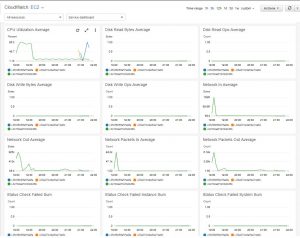
Note: Give 5-10 minutes for Cloud Watch to generate stats and have some movements to the metrics, if EC2 instances were not monitored previously.
To turn off the monitoring, simply use `unmonitor()`
ec2.unmonitor_instances(InstanceIds = ['i-0fc36bf8fef1fe9fe'])
The data of EC2 instances and their status is stored in the Pandas dataframe `data_ec2`
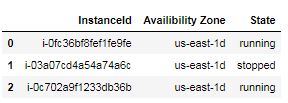
Start the stopped instance:
ec2.start_instances(InstanceIds=list(data_ec2.loc[data_ec2['State'] == 'stopped', 'InstanceId']))
the code gives output:
{'ResponseMetadata': {'HTTPHeaders': {'content-length': '579',
   'content-type': 'text/xml;charset=UTF-8',
   'date': 'Mon, 18 Feb 2019 22:18:59 GMT',
   'server': 'AmazonEC2'},
  'HTTPStatusCode': 200,
  'RequestId': '05353ee5-11bc-4d5e-a760-d24ca94d272e',
  'RetryAttempts': 0},
 'StartingInstances': [{'CurrentState': {'Code': 0, 'Name': 'pending'},
   'InstanceId': 'i-03a07cd4a54a74a6c',
   'PreviousState': {'Code': 80, 'Name': 'stopped'}}]}
As you can see, `'InstanceId': 'i-03a07cd4a54a74a6c'` instance is now requested to start.
Update the status of EC2 instance in the application:
response = ec2.describe_instances()

data_ec2 = get_ec2_status(response)
print(data_ec2)
Output:
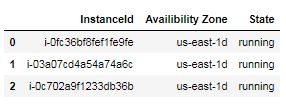
As we can see, all the instances are now running.
ec2.stop_instances(InstanceIds=list(data_ec2.loc[data_ec2['State'] == 'running', 'InstanceId']))
Output:
{'ResponseMetadata': {'HTTPHeaders': {'content-length': '1257',
   'content-type': 'text/xml;charset=UTF-8',
   'date': 'Mon, 18 Feb 2019 22:25:58 GMT',
   'server': 'AmazonEC2'},
  'HTTPStatusCode': 200,
  'RequestId': '51426fa8-c4ac-4463-84af-b5fd779b905b',
  'RetryAttempts': 0},
 'StoppingInstances': [{'CurrentState': {'Code': 64, 'Name': 'stopping'},
   'InstanceId': 'i-0c702a9f1233db36b',
   'PreviousState': {'Code': 16, 'Name': 'running'}},
  {'CurrentState': {'Code': 64, 'Name': 'stopping'},
   'InstanceId': 'i-03a07cd4a54a74a6c',
   'PreviousState': {'Code': 16, 'Name': 'running'}},
  {'CurrentState': {'Code': 64, 'Name': 'stopping'},
   'InstanceId': 'i-0fc36bf8fef1fe9fe',
   'PreviousState': {'Code': 16, 'Name': 'running'}}]}
Updating the `data_ec2` in our application:
response = ec2.describe_instances()
data_ec2 = get_ec2_status(response)
print(data_ec2)
Output:
The syntax is very similar to the `client` interface.
ec2_resource = boto3.resource('ec2')
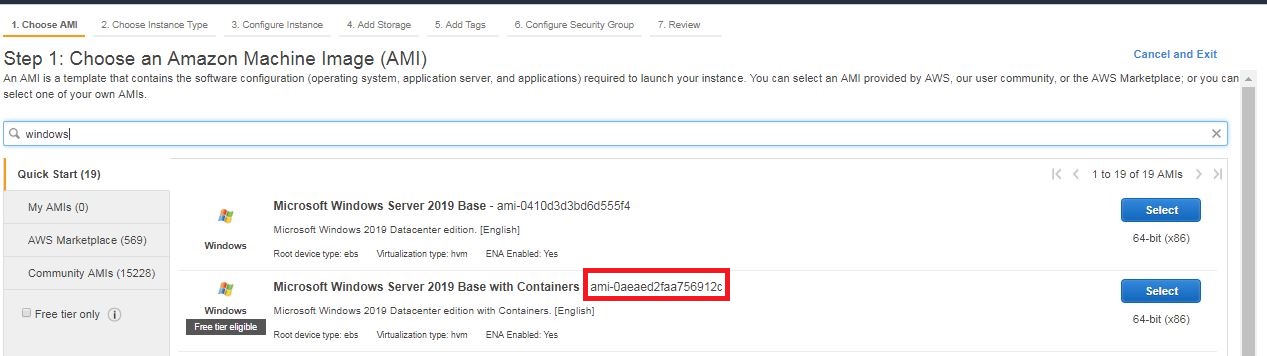
Go to the EC2 Launch wizard and copy the AMI that you want to resource from AWS arsenal.
list_ec2 = ec2_resource.create_instances(ImageId='ami-0a483c9901a5df3b7', MinCount=1, MaxCount=3)

ec2_created = [ec2_instance.id for ec2_instance in list_ec2]
The code creates 3 EC2 instances and stores their generated `InstanceId` in `ec2_created` list.
Get the latest EC2 deployment status.
data_ec2 = get_ec2_status(response)
print(data_ec2)
Output:
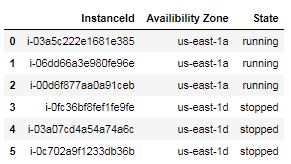
As seen, now AWS has 3 new EC2 instances running, in addition to 3 stopped ones.
ec2.terminate_instances(InstanceIds=ec2_created)
Output:
{'ResponseMetadata': {'HTTPHeaders': {'content-type': 'text/xml;charset=UTF-8',
   'date': 'Mon, 18 Feb 2019 22:47:57 GMT',
   'server': 'AmazonEC2',
   'transfer-encoding': 'chunked',
   'vary': 'Accept-Encoding'},
  'HTTPStatusCode': 200,
  'RequestId': 'ca449800-58e0-47e9-b41f-ba5424d298b8',
  'RetryAttempts': 0},
 'TerminatingInstances': [{'CurrentState': {'Code': 32,
    'Name': 'shutting-down'},
   'InstanceId': 'i-06dd66a3e980fe96e',
   'PreviousState': {'Code': 16, 'Name': 'running'}},
  {'CurrentState': {'Code': 32, 'Name': 'shutting-down'},
   'InstanceId': 'i-00d6f877aa0a91ceb',
   'PreviousState': {'Code': 16, 'Name': 'running'}},
  {'CurrentState': {'Code': 32, 'Name': 'shutting-down'},
   'InstanceId': 'i-03a5c222e1681e385',
   'PreviousState': {'Code': 16, 'Name': 'running'}}]}
The code requests AWS resources to terminate the 3 EC2 instances, leaving the other 3 instances stopped.
import boto3
import pprint as pprint
import pandas as pd

# EC2 client and Response

ec2 = boto3.client('ec2')
response = ec2.describe_instances()

print(response)

# Function for status reporting

def get_ec2_status(response):
av_zones, instance_ids, state_names= [], [], []
for res in response['Reservations']:
for ins in res['Instances']:
av_zones.append(ins['Placement']['AvailabilityZone'])
instance_ids.append(ins['InstanceId'])
state_names.append(ins['State']['Name'])
return pd.DataFrame({
'InstanceId': instance_ids,
'Availibility Zone': av_zones,
'State': state_names
})


response = ec2.describe_instances()
data_ec2 = get_ec2_status(response)
print(data_ec2)


# EC2 Monitoring

response_running = ec2.describe_instances(Filters=[{'Name' : 'instance-state-name','Values' : ['running']}])
data_ec2_running = get_ec2_status(response)
print(data_ec2_running)


ec2.monitor_instances(InstanceIds = ['i-0fc36bf8fef1fe9fe'])


# Start EC2 Instances

ec2.start_instances(InstanceIds=list(data_ec2.loc[data_ec2['State'] == 'stopped', 'InstanceId']))
response = ec2.describe_instances()
data_ec2 = get_ec2_status(response)
print(data_ec2)


# Stop EC2 Instances

ec2.stop_instances(InstanceIds=list(data_ec2.loc[data_ec2['State'] == 'running', 'InstanceId']))
response = ec2.describe_instances()
data_ec2 = get_ec2_status(response)
print(data_ec2)


# Create EC2 Instances

ec2_resource = boto3.resource('ec2')
list_ec2 = ec2_resource.create_instances(ImageId='ami-0a483c9901a5df3b7', MinCount=1, MaxCount=3)
ec2_created = [ec2_instance.id for ec2_instance in list_ec2]
print(ec2_created)


response = ec2.describe_instances()
data_ec2 = get_ec2_status(response)
print(data_ec2)


# Terminate EC2 Instances

ec2_client.terminate_instances(InstanceIds=ec2_created)